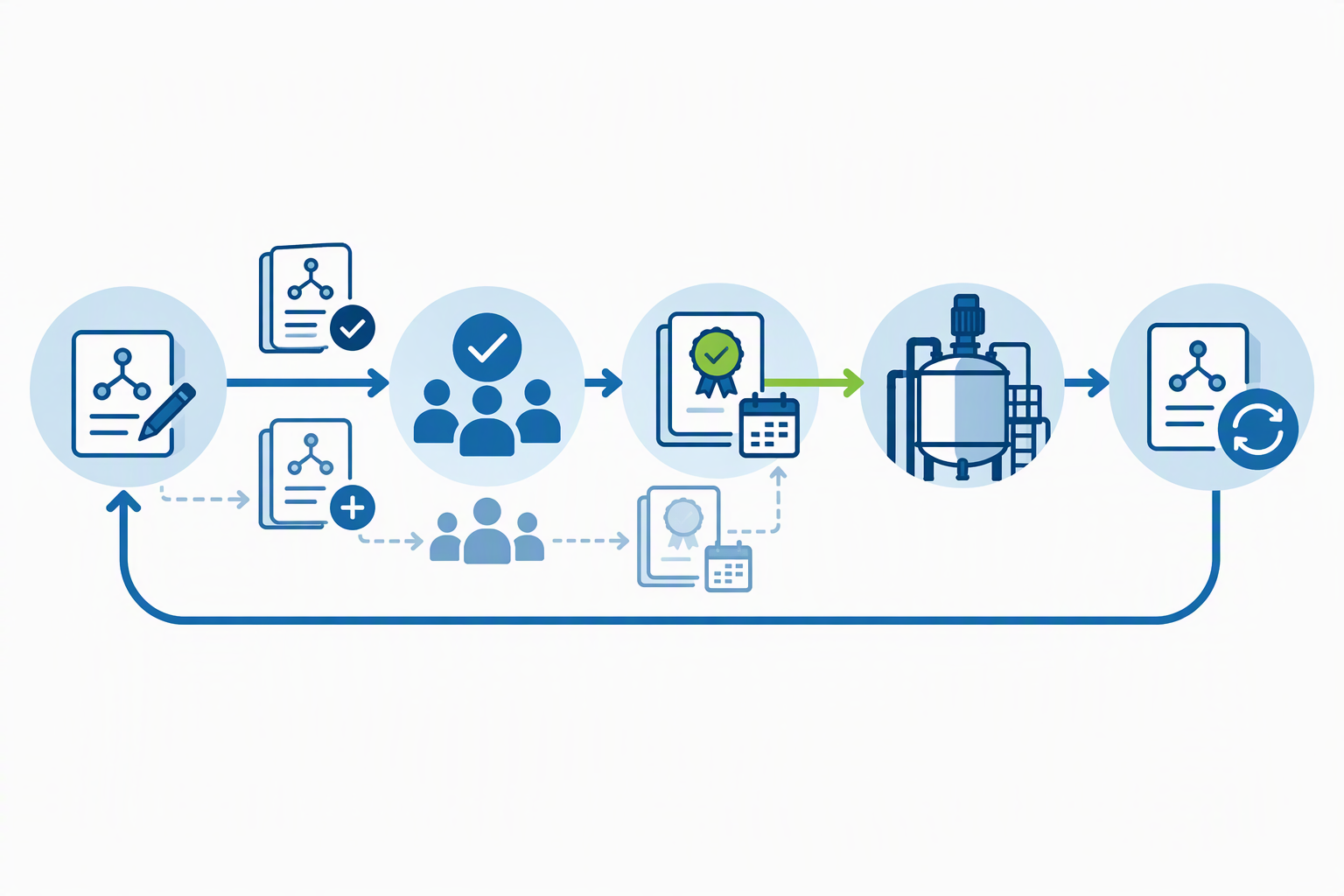
For chemical manufacturers, formulas are at the heart of the business. A seemingly simple change to an ingredient, quantity, concentration, or substitute material can reach far beyond R&D. It can affect purchasing, inventory requirements, production planning, product cost, quality processes, and the materials operators are expected to consume on the plant floor.
Modern chemical manufacturers need a controlled process for moving formulation changes from development into production without relying on spreadsheets, tribal knowledge, or someone remembering which version is current.
For organizations running Microsoft Dynamics 365 Business Central, production BOMs and production BOM versions can form part of that control framework. Microsoft notes that production BOMs define the components used to manufacture an item and that, in some industries, these BOMs are called recipes or formulas because they define the ingredients and quantities required.
Is the right formula driving production?
When a formula changes, how confident are you that the right version will drive the right production at the right time?
The Industry Challenge: Formulas Don’t Stay Static
Chemical formulations change for many legitimate business reasons. A manufacturer may need to respond to:
Changes in raw-material availability
Supplier changes
Product improvements
Customer-specific requirements
Cost pressures
Changes initiated by R&D or operations
Material substitutions
Manufacturing process improvements
Those changes create a governance challenge. The problem isn’t simply maintaining the formula itself. The business needs to control the transition from what it manufactures today to what it intends to manufacture next.
Poorly controlled changes can create uncertainty around material requirements, production instructions, purchasing decisions, costing, and which formulation production should actually use.
Moving Beyond Spreadsheet-Based Formula Management
Spreadsheets are flexible, which makes them attractive for development and analysis. They become problematic when they function as the operational source of truth for production. When formulas exist across spreadsheets, shared folders, emails, ERP records, and employee knowledge, fundamental questions become harder to answer:
Which formula is current?
Which version should production use?
What changed?
Has the new version been released?
When should it take effect?
What components are now required?
What happens to existing material demand?
What does the change do to product cost?
For executive teams, this is ultimately a master-data governance problem. The objective is to create a controlled transition between formula development and manufacturing execution.
What Controlled Formula Management Looks Like
A mature approach separates the lifecycle of a formulation into distinct states:
Develop → Review → Release → Produce → Revise
The precise process will vary by manufacturer, but an important principle remains: changing tomorrow’s formula should not mean manually overwriting today’s production definition without control.
Business Central provides production BOM statuses and versioning capabilities that can support this principle. Microsoft documents statuses including New, Certified, Under Development, and Closed for production BOMs and their versions. A production BOM must be certified before it can be used in manufacturing, and Microsoft specifically advises creating a new version rather than changing a certified production BOM directly.
Building Controlled Formula Change
1. Establish a Controlled Formula Master
The first objective is creating a reliable operational definition of what goes into the product. In Business Central, a production BOM defines the components required to produce the parent item, including the component, quantity, and unit-of-measure information necessary for manufacturing.
For a chemical manufacturer, the production BOM can represent the ingredient structure used for manufacturing. For example, the production definition might include:
Base chemical
Additive A
Additive B
Pigment
Stabilizer
Packaging-related components
This gives purchasing, planning, inventory, manufacturing, and costing a common material definition.
2. Version the Formula Instead of Overwriting It
This is one of the most important controls. Rather than continually changing one production formula, manufacturers can maintain different versions. Business Central supports production BOM versions, including the ability to assign a version code and a starting date.
This is especially relevant when a manufacturer needs to prepare a future formulation without immediately replacing the current manufacturing definition.
CURRENT FORMULA
NEW VERSION
→
Base resin
→
Base resin
→
Additive A
→
Additive B
→
Pigment X
→
Pigment X
The important management question becomes not merely “What changed?” but “Which version should govern production?”
3. Control When a New Version Becomes Effective
Formula management needs a time dimension. A new formulation may be approved today but intended for use at a later point. Business Central’s production BOM versions include a starting date that determines when the version becomes valid.
That creates a much stronger control model than distributing a revised spreadsheet and asking production to begin using it next week. It gives the organization a structured master-data change rather than an informal operational handoff.
4. Keep Development Separate from Released Production
Another important concept is preventing unfinished formula changes from unintentionally becoming the manufacturing standard. Business Central’s production BOM lifecycle supports this separation: Under Development is used while editing a production BOM or version, and Certified is required before it can be used in manufacturing.
Development should be allowed to change without automatically changing production. That separation helps establish clearer ownership between the people developing or maintaining formulations and the operation responsible for producing sellable product.
5. Understand the Manufacturing Impact
Formula governance cannot end when a new version is released. The production BOM determines material requirements on production orders, while Business Central’s broader manufacturing functionality connects production BOMs, routings, capacity, production orders, material consumption, output, inventory, and costing. Executives should therefore ask:
Does the new formula require different materials?
Are those materials available?
Does purchasing need to react?
What happens to materials associated with the previous formula?
Does the change affect expected product cost?
Are production teams operating from the resulting production requirements?
The ERP becomes more valuable when formula management is connected to these downstream decisions rather than treated as an isolated technical record.
6. Connect Formula Changes to Cost Visibility
For manufacturing executives, one of the most important implications of a formulation change is economic. Replacing an ingredient or changing its required quantity changes the material structure of the manufactured product. Business Central combines production BOMs with routings, work centers, and machine centers to represent manufacturing resources and costs.
Formula governance and cost governance therefore should not operate independently. A technically valid formulation may still have a meaningful impact on:
Expected material cost
Manufacturing cost
Product margin
Inventory requirements
Purchasing demand
This is where connecting formula data with ERP becomes strategically useful.
The Role of Microsoft Dynamics 365 Business Central
Business Central can provide the transactional backbone connecting the manufacturing definition to the rest of the operation. Relevant standard manufacturing capabilities include:
Production BOMs: Define the components used to manufacture an item. In certain industries, these are called formulas or recipes.
Production BOM Versions: Maintain versions rather than simply replacing the manufacturing definition.
Starting Dates: Determine when a production BOM version becomes valid.
Status Control: Distinguish New, Certified, Under Development, and Closed statuses, with certification required for manufacturing use.
Manufacturing Integration: Connect BOMs and routings with production orders, planning, inventory, warehouses, costs, material consumption, and production output.
These capabilities make Business Central a useful foundation for manufacturers that want formula changes to become controlled manufacturing master-data changes instead of isolated spreadsheet updates.
Where Business Central May Be Part of a Broader Solution
Business Central’s production BOM provides the manufacturing component structure, but chemical manufacturers can have requirements that extend beyond a production BOM. Depending on the operation, those could include formulation development, laboratory processes, specifications, certificates, quality processes, regulatory data, or other process-manufacturing controls.
Those requirements should be evaluated individually and may call for configuration, a Business Central extension, integration, or another specialized system.
THE WRONG QUESTION
THE RIGHT QUESTION
→
Can we put every chemical process inside Business Central?
→
What information belongs in Business Central so formula changes remain connected to planning, inventory, production, and financial performance?
That produces a much more sustainable ERP architecture.
Questions Chemical Manufacturing Executives Should Ask
Formula Control
Do we have one reliable manufacturing definition for each product?
Version Control
Can we distinguish the formula being manufactured today from the formula being prepared for tomorrow?
Release Control
Can unfinished formulation changes be kept separate from released production definitions?
Effective Dates
Can we control when a new manufacturing version becomes valid?
Material Impact
Can planning and purchasing see the material requirements generated from the manufacturing definition?
Cost Impact
Can management evaluate how changes to product structure affect manufacturing cost?
Production
Can the organization confidently identify which manufacturing definition should drive production?
If several of these questions are difficult to answer, formula management may be functioning as a document-management exercise rather than an integrated manufacturing process.
The Executive Takeaway
Formula change is inevitable. Loss of control isn’t.
For chemical manufacturers, effective formula governance means establishing a controlled path from product change to production execution while maintaining visibility into the materials and business processes affected by that change. Microsoft Dynamics 365 Business Central provides production BOMs, versions, starting dates, statuses, production orders, and integrated manufacturing functionality that can form an important part of that foundation.
The strategic objective is straightforward:
Know what you make today, know what you’re changing tomorrow, and control exactly when that change reaches production.
That is the difference between maintaining formulas and managing formula change.
Achieving End-to-End Batch Traceability in Chemical Manufacturing
True end-to-end batch traceability means being able to follow materials from supplier receipt through production, intermediate batches, finished goods, inventory movements, and ultimately to the customers who received the product.
Ready to improve visibility,
reduce operational complexity and build a stronger foundation for growth?
Whether you’re evaluating a new ERP platform, planning an upgrade, or improving your manufacturing operations, a Manufacturing Strategy Session can help identify opportunities to improve visibility, operational performance, and determine the right path forward.