



Business Central

Case Studies
Plastics Manufacturing
Achieving End-to-End Lot Traceability in Plastics Manufacturing
An Industry Case Study for Manufacturing Executives — Powered by Microsoft Dynamics 365 Business Central

This is a composite industry case study, not the story of one named manufacturer. It reflects operating patterns found across injection molding, extrusion, blow molding, thermoforming, compounding, converting, and other mixed-mode plastics environments.
General plastics manufacturing has become too dynamic for a production schedule that lives primarily in spreadsheets. Customer priorities shift, resin and additive availability changes, labor fluctuates, machines go down, tooling requires maintenance, and color or material sequences affect setup time and purge loss. At the same time, U.S. plastics production, employment, inventory, and capacity utilization showed significant volatility during 2025—conditions that make timely replanning increasingly important.
Across the sector, leading manufacturers are replacing disconnected planning files with an integrated operating model. Demand, materials, production orders, purchasing, inventory, work-center capacity, and shop-floor activity are increasingly managed from a shared ERP foundation. The objective is not to eliminate Excel as an analysis tool; it is to stop using a spreadsheet as the unofficial system of record for production decisions.
Microsoft Dynamics 365 Business Central provides that foundation for small and mid-sized manufacturers. Its Premium manufacturing capabilities connect production BOMs, routings, work and machine centers, shop calendars, MPS/MRP, production orders, inventory, purchasing, costing, and capacity visibility. For plastics operations requiring sophisticated sequence optimization—such as detailed mold allocation, color sequencing, tooling restrictions, or labor-skill constraints—Business Central can be extended with specialized scheduling and process-manufacturing applications.
Is a spreadsheet still acting as the unofficial system of record for production decisions, while inventory, purchasing, production, costing, and customer records are updated later—or not at all?
Spreadsheet scheduling often begins innocently. A scheduler exports sales orders, creates rows for machines, adds estimated run times, and applies color coding to indicate job status. Buyers maintain a shortage list separately. Supervisors adjust priorities at shift meetings, while customer service works from another delivery-date report.
As the plant becomes more complex, that arrangement creates multiple versions of operational reality. Manual updates, formula risk, email copies, and version conflicts consume planner time and make changes difficult to propagate through production. Siemens describes the result as planners spending time on manual updates, version checks, and data rework while collaboration slows and the plan becomes less reliable.
| Executive concern | Spreadsheet-based condition | Operational consequence |
|---|---|---|
| Capacity utilization | Machine hours are maintained separately from live production orders, calendars, downtime, and actual run times. | Resources can appear available when already committed—or constrained when actual capacity exists elsewhere. |
| Machine and tool scheduling | Machine, mold, die, fixture, and auxiliary-equipment requirements are represented through manually maintained columns or planner knowledge. | Incompatible assignments, double-booked tooling, and avoidable changeovers become more likely. |
| Labor planning | Shift coverage and specialized labor availability are updated independently of the machine schedule. | A technically open machine may not represent executable capacity. |
| Material availability | Resin, additive, masterbatch, packaging, and purchase-order status are copied from inventory systems at intervals. | A job may be scheduled before all required materials are available. |
| Inventory visibility | Raw material, WIP, regrind, and finished-goods data are reconciled after transactions occur. | Planning is based on a snapshot rather than the current inventory position. |
| Lead-time reliability | Delivery dates are calculated without a continuously synchronized demand-and-supply model. | Customer commitments can be made before capacity and material feasibility are understood. |
| Customer service | Schedule changes are communicated through email, calls, or meetings. | Sales and service may provide dates based on an obsolete version of the plan. |
| Continuity and governance | Formulas, prioritization rules, and workarounds reside with individual planners. | Planning knowledge becomes difficult to audit, standardize, or transfer. |
These are not arguments that spreadsheets are inherently defective. Excel remains valuable for analysis, reporting, modeling, and controlled bulk updates, and Business Central itself supports exporting, analyzing, and updating data through Excel.
The risk emerges when operational decisions are made in the spreadsheet but inventory, purchasing, production, costing, and customer records are updated later—or not at all.
Plastics scheduling is not simply the assignment of an order to an open machine. A viable production sequence may depend on resin and additive availability, machine capability, tooling, cavities, cycle times, setup labor, downstream finishing, packaging capacity, maintenance, quality status, and customer priority.
Changeover sequence also matters. Grouping production by resin family, color, mold, or machine can reduce unnecessary purging, cleaning, setup activity, and downtime. Plastics ERP providers consequently treat materials, tooling, capacity, color, mold, and machine sequencing as connected scheduling variables rather than independent planning fields.
General plastics operations may also combine discrete and process characteristics. A plant can blend or compound material in batches, convert it through extrusion or molding, and then perform discrete assembly, decoration, inspection, or packaging. These mixed-mode environments must sequence capacity and raw-material availability together.
The leading practice is no longer to produce a “perfect” weekly spreadsheet. It is to establish a planning loop capable of absorbing change.
Industry sources describe manufacturers investing in ERP, MES, machine connectivity, dashboards, and advanced planning tools. The next maturity step is coordinating decisions across capacity, material availability, labor, maintenance, inventory, and customer priorities rather than merely collecting more data.
Capture Demand → Calculate Material Requirements → Translate Demand into Operations → Model Practical Capacity → Release and Execute Production Orders → Record Output, Time, Scrap, and Consumption → Replan by Exception
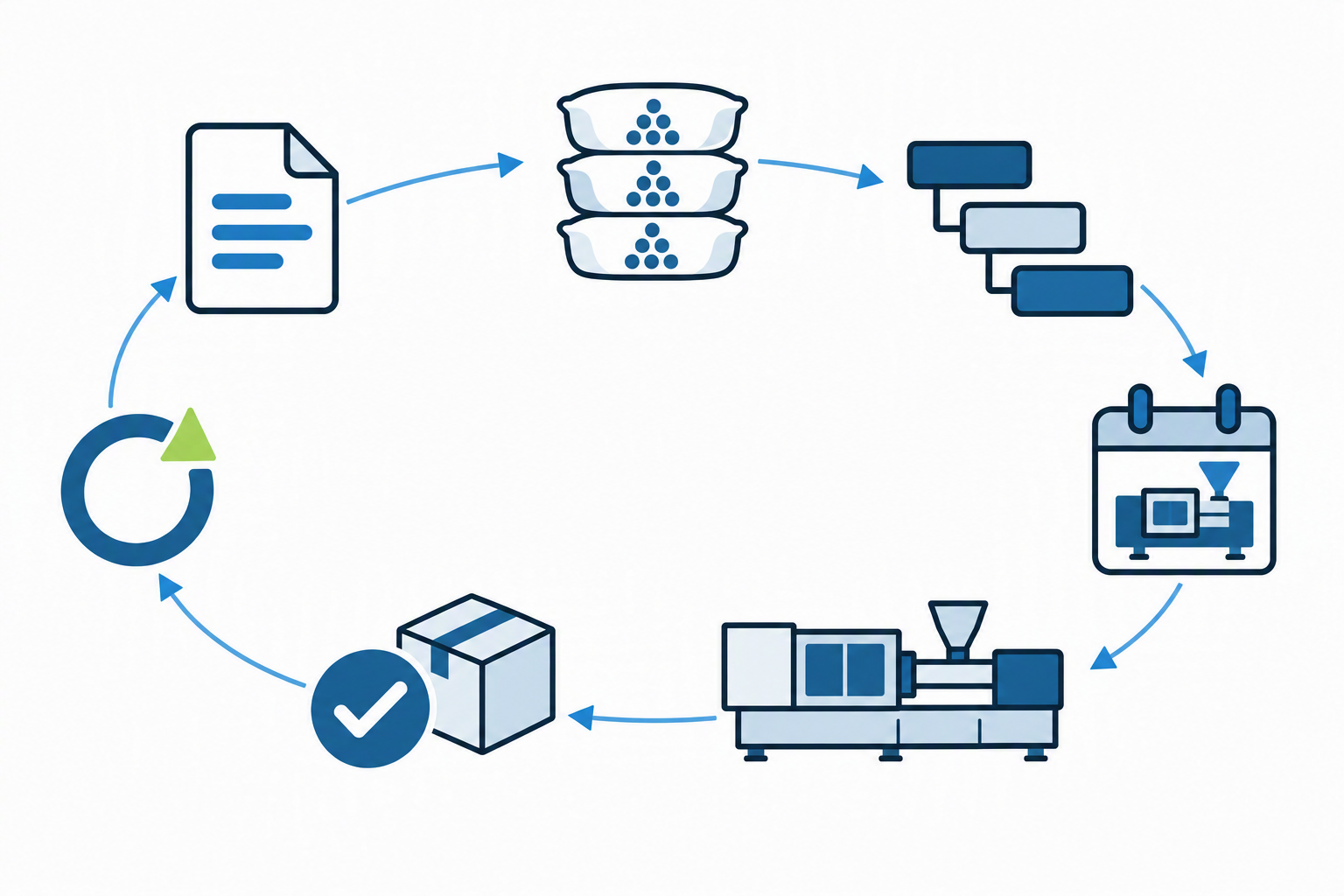
A modern operating model typically includes:
In the representative plastics plant, the “master schedule” was a workbook owned by one or two experienced planners. Orders were imported from the ERP, available hours were maintained manually, and shortages were reconciled against separate buyer reports. Color changes, resin compatibility, tooling, secondary operations, and customer expedites were managed through formatting, comments, meetings, and institutional knowledge.
The schedule worked while product mix, customer demand, and resource combinations remained manageable. As complexity increased, planners spent more time assembling the schedule than analyzing alternatives. Supervisors questioned whether they had the latest version, customer service could not confidently interpret changes, and every disruption triggered another reconciliation cycle.
The industry response is not to copy every spreadsheet formula into ERP. Manufacturers first standardize the data and rules on which scheduling depends:
This creates a common operational vocabulary. Business Central then connects demand and supply planning, while production orders connect the plan to execution.
The modernized plant no longer treats the spreadsheet as the authority. Planners review demand and MRP/MPS suggestions, assess material shortages, inspect work-center load, and manage constrained resources within a common planning environment. Supervisors work from released production orders, and reported consumption, output, time, and scrap update inventory, capacity, progress, and cost records.
Excel may still be used for ad hoc analysis or presentation, but accepted decisions are returned to Business Central. When production changes, the organization can see the effect on materials, capacity, orders, and delivery requirements without manually reconciling a chain of independent files. That is the central industry shift: from spreadsheet replacement to operational integration.

Business Central’s manufacturing model connects planning, production orders, material consumption, operation time, output, inventory, costing, and analytics. Its core capabilities map directly to plastics scheduling requirements:
Microsoft documents that machine centers can represent operators and machines, while work-center calendars account for working hours, shifts, holidays, and absence. Work and machine centers also carry capacity, efficiency, setup, run-time, and cost information used in scheduling and costing.
The Planning Worksheet can calculate MPS and MRP from actual and forecast demand. It nets demand against on-hand and expected supply and produces action messages that recommend new, changed, rescheduled, or canceled production, purchase, assembly, and transfer orders. This connects scheduling decisions to purchasing and material availability instead of treating them as separate exercises.
Business Central supports both load visibility and finite loading for selected capacity-constrained work or machine centers. Constrained operations are assigned to available time, helping prevent critical resources from being loaded above configured capacity.
However, Microsoft describes this as rough-cut, feasible resource scheduling, not an automatically maintained optimization schedule. The core planning system does not provide dedicated capacity leveling or fine-scheduling logic based on complex sequencing and optimization rules.
That distinction matters in plastics. Native Business Central may be sufficient when routings, work-center load, selected constrained resources, and planner-directed sequencing meet the plant’s requirements. An extension or APS solution should be evaluated when scheduling must simultaneously optimize:
Industry-specific Business Central extensions can add sequence planning, setup matrices, graphical scheduling, tool capacity, and skills-aware resource planning while preserving Business Central as the transactional backbone.
|
SPREADSHEET SCHEDULE
|
CONNECTED PLANNING
|
|---|---|
|
The master schedule is a workbook owned by one or two experienced planners
|
Planners review demand and MRP/MPS suggestions within a common planning environment
|
|
Shortages are reconciled against separate buyer reports
|
Material shortages are assessed alongside inventory, purchasing, and work-center load
|
|
Supervisors question whether they have the latest version
|
Supervisors work from released production orders
|
|
Every disruption triggers another reconciliation cycle
|
Changes show their effect on materials, capacity, orders, and delivery requirements
|
Excel still has a role, but the boundary is clear: Excel supports analysis; Business Central governs accepted production, material, capacity, and delivery decisions.
The following outcomes should be treated as measurement objectives, not guaranteed software results:
| Outcome area | Expected direction of improvement | Executive measures |
|---|---|---|
| Visibility | One shared view of demand, supply, production, and capacity | Schedule adherence, late orders, shortage exceptions |
| Capacity management | Earlier identification of bottlenecks and unused capacity | Work-center load, effective capacity, queue time |
| Material readiness | Better alignment of production releases with inventory and purchasing | Material-shortage incidents, expedited purchases |
| Responsiveness | Faster evaluation of changed priorities or machine availability | Replanning cycle time, frozen-schedule changes |
| Throughput | Better sequencing and reduced avoidable waiting or setup activity | Output per constrained hour, setup time, WIP age |
| Planning accuracy | Greater alignment between planned and actual time and consumption | Capacity variance, consumption variance |
| Customer service | More supportable completion and delivery information | On-time-in-full, promise-date changes |
| Governance | Reduced dependence on personal files and undocumented logic | Manual overrides, offline schedules, master-data exceptions |
Integrated planning does not create improvement by itself. Value comes from accurate BOMs and routings, realistic calendars, reliable inventory transactions, timely shop-floor reporting, disciplined production-order status, and clear ownership of planning parameters. Business Central provides the connected architecture, while operating discipline determines whether the resulting plan is trusted.
Do our production decisions now require simultaneous awareness of demand, materials, machines, tooling, labor, maintenance, and downstream operations?
Because our schedule is separate from inventory and execution, does every operational change require manual synchronization?
Are MPS/MRP, BOMs, routings, production orders, work-center capacity, inventory, purchasing, costing, and analytics connected on one shared foundation?
Is finite loading of selected constrained resources enough, or does detailed plastics optimization justify a specialized extension or APS layer?
Have we defined where Excel supports analysis and where Business Central governs accepted production, material, capacity, and delivery decisions?
Are we seeing fewer offline schedules, faster shortage resolution, improved plan-versus-actual visibility, more stable production priorities, and more defensible customer commitments?
The real business risk is not spreadsheet error alone; it is decision latency. Do not “ban Excel”—define the boundary, and measure adoption operationally.
For plastics manufacturers, eliminating spreadsheet-based scheduling is not primarily a technology project. It is an operating-model change—from isolated planner knowledge to governed planning data, from periodic snapshots to connected transactions, and from schedule rebuilding to exception management.
Microsoft Dynamics 365 Business Central provides a practical platform for that transition when implemented with plastics-specific BOMs, routings, resources, calendars, inventory policies, and shop-floor reporting—and extended where advanced sequencing demands it.
The strategic objective is to make the schedule part of the company’s operational system rather than a file sitting beside it.








Whether you’re evaluating a new ERP platform, planning an upgrade, or improving your manufacturing operations, a Manufacturing Strategy Session can help identify opportunities to improve visibility, operational performance, and determine the right path forward.
